 HFConverse
On the Air
Who's on the air right now.
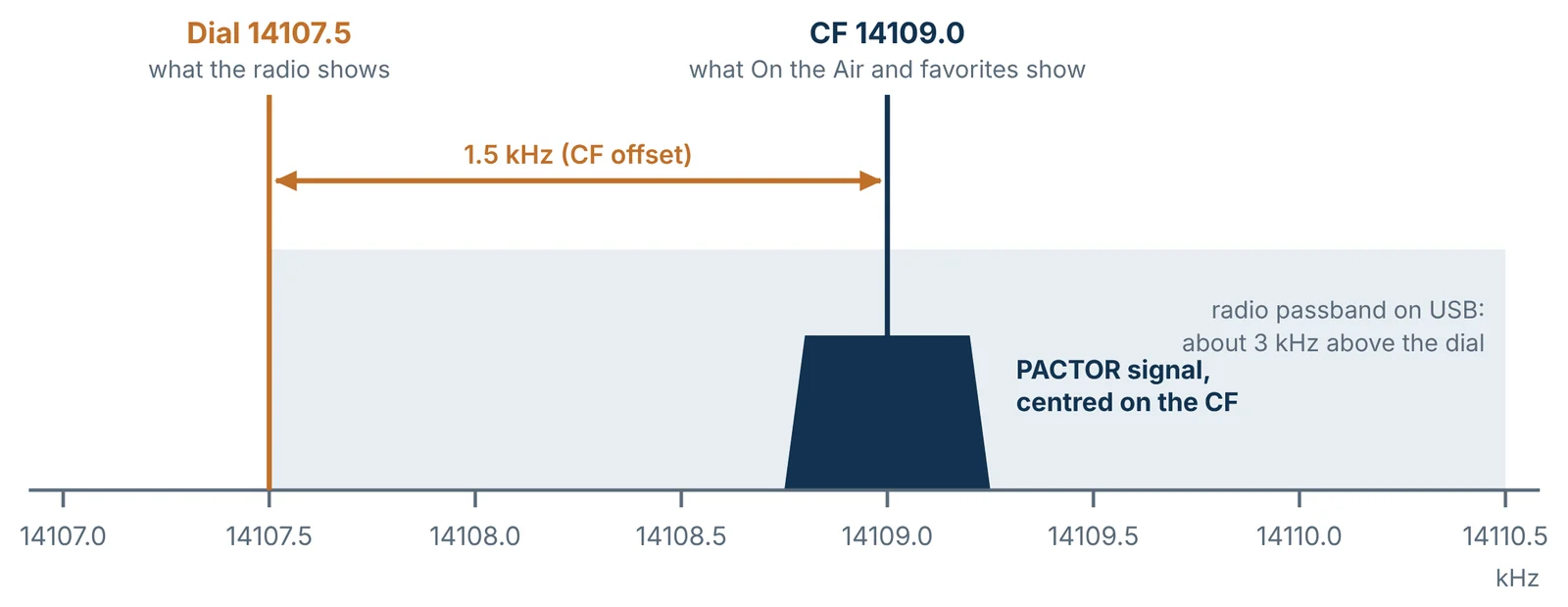
A live map and list of HFConverse operators announcing activity from the app. Dots sit in the station's grid square, coloured by mode, with the night side shaded and the greyline. Frequencies are in kHz and labelled by mode: PACTOR rows show the centre frequency (CF), so set your radio's dial 1.5 kHz below it for the standard SCS 1500 Hz tones; CW rows, labelled CW, show the CW signal itself (your dial + 1.4 kHz), the frequency you'd tune to and hear the station, as on a DX cluster; every other mode (RTTY and so on) shows the dial frequency, to use as it is. In HFC, click a spot and it sets your frequency for you. CF or dial?
PA PACTOR AM AMTOR RT RTTY PS PSK31 PK Packet CW CW
| Callsign | Frequency | Activity | Last seen | ||
|---|---|---|---|---|---|
| Loading… | |||||
Announcing is opt-in and done from within the HFConverse app — this page just shows what operators have chosen to publish. The list refreshes automatically.
CF or dial?
For PACTOR, On the Air and HFC's favorites show the centre frequency: where the signal actually sits. Your radio, on USB, shows the dial frequency, 1.5 kHz lower. So a spot at CF 14109.0 means a dial of 14107.5. HFC does the sum for you when it sets the frequency.
Get a push when a station comes up
Pick a callsign, or any callsign, and a band, or any band. Your phone or desktop gets a notification when that station appears on the On the Air list in PACTOR, or moves to a new band.
- Create a Pushover account and install the Pushover app on your phone or desktop.
- Log in to alerts with your email — no password, we send you a one-time link.
- Paste your Pushover user key, add your rules, and send a test alert.
Pushover is a one-time payment of US$4.99 per platform (iPhone/iPad, Android or desktop), paid to Pushover — not to HFConverse. PACTOR spots only for now.
What an alert looks like
Activity: CQ · Grid: IO82
Activity: CQ · Grid: IO82
Tap an alert to open the On the Air list.
Run Node-RED? Put this list, with alerts, on your own dashboard.